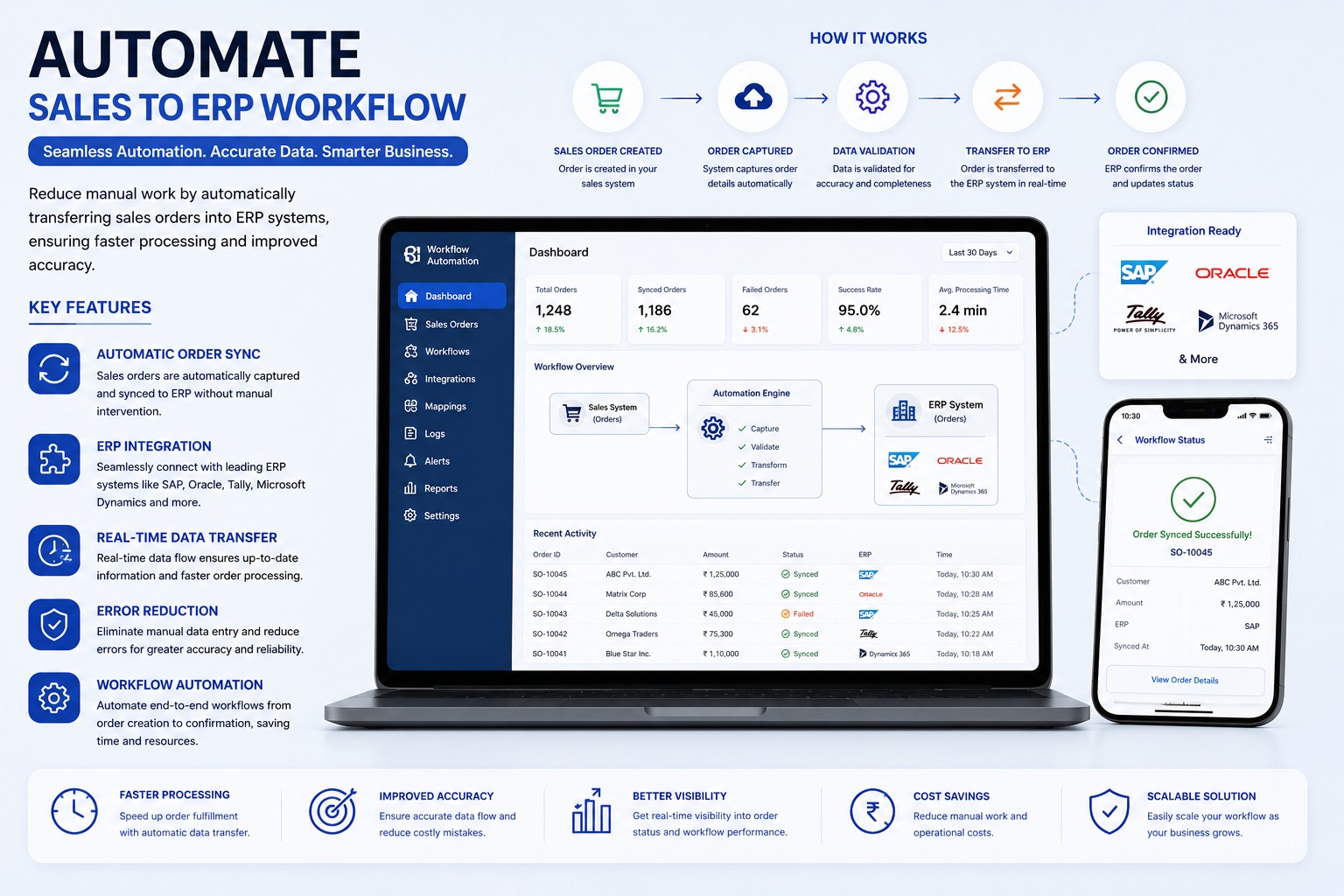
When sales teams create orders in CRM, dealer portals, mobile apps, or spreadsheets, ERP users often enter the same order again manually. Sales-to-ERP automation removes this duplicate work.
Order Capture And Mapping
The workflow captures order details from the sales system, maps products, customers, taxes, units, warehouses, and branches to ERP values, and validates the data before transfer.
Validation And Exception Handling
Orders with missing customers, invalid products, incorrect tax details, insufficient stock, or credit-limit issues can be held before ERP posting. Users can correct only failed records and retry them.
Useful Workflow Features
- Real-time or scheduled order sync
- Duplicate order prevention
- Credit limit and stock checks
- Approval routing before ERP transfer
- ERP order number and status sync back to sales system
Business Benefits
The process reduces order delays, fulfilment errors, manual effort, and operating cost. Management gets visibility into successful, pending, and failed order transfers.
Explore the Sales to ERP Workflow Automation
Synchronize sales orders from CRM, e-commerce, and dealer portals directly into ERP with automated validation and stock checks.
Sales to ERP Workflow Automation FAQs: Features, Workflows & Best Practices
Comprehensive answers to frequently asked technical, operational, and implementation questions about sales to erp workflow automation in India.
What is Sales to ERP Workflow Automation and how does it accelerate customer order dispatch?
Sales to ERP Workflow Automation is an end-to-end integration solution that captures confirmed customer sales orders from front-end sales channels (CRM, mobile sales apps, B2B dealer portals, e-commerce websites, or EDI) and automatically validates, maps, and creates sales orders (such as VA01 in SAP) in the ERP.
Which sales channels and ordering platforms can be synchronized into the central ERP?
The automation connects with leading CRM platforms (Salesforce, HubSpot, custom CRMs), B2B dealer/distributor ordering apps, e-commerce marketplaces (Shopify, WooCommerce, Amazon), EDI feeds, and structured Excel/CSV order batches sent via email.
How does the workflow validate customer master data, pricing tiers, and real-time inventory before ERP creation?
Upon receiving an order, the system validates customer credit limits, checks customer-specific pricing contracts or discount matrices, verifies real-time stock availability in the assigned shipping plant, and validates shipping address master data prior to posting.
What happens if product SKU codes in the sales platform differ from ERP material master numbers?
The solution includes an intelligent SKU translation cross-reference table that automatically maps external product codes, dealer part numbers, or barcode identifiers to internal ERP material master codes without requiring manual intervention.
How does the system handle customer credit limit breaches and automated sales approval holds?
If a customer's order pushes outstanding receivables beyond their approved credit threshold, the automation creates the order under a "Credit Block / Manager Review" status in the ERP and dispatches an automated notification to the finance manager.
How does real-time sales order sync eliminate manual order transcription errors and delivery delays?
Manual re-typing of orders between systems frequently leads to incorrect quantities, wrong item variants, delivery address errors, and processing backlogs. Automated synchronization processes orders within seconds with 100% data fidelity.
Are automated order status updates and dispatch notifications communicated back to sales reps and clients?
Yes. Once the ERP generates the official Sales Order number, Delivery Note, or Invoice, the automation syncs tracking information and shipment status back to the CRM and sends automated WhatsApp/SMS alerts to the client.
How does the system manage order amendments, cancellations, backorders, and partial line fulfillment?
If an item is out of stock or partially available, the workflow can split orders, generate backorder notifications, or trigger configured business workflows for partial shipment, keeping both the buyer and warehouse aligned.
Does the automation record complete transaction logs and error notification alerts for IT administrators?
Yes. Every transaction payload, mapping timestamp, ERP response code, and generated document number is recorded in a centralized monitoring dashboard with automated email/Slack alerts for any failed sync attempts.
Which ERP platforms (SAP ECC, S/4HANA, Microsoft Dynamics, Tally, Zoho) can be integrated?
The workflow is built on standardized REST/SOAP APIs and enterprise connectors supporting SAP ECC, SAP S/4HANA, Microsoft Dynamics 365, Oracle NetSuite, Tally Prime, Zoho Books, and bespoke legacy ERP systems.
Have more questions about implementing Sales to ERP Workflow Automation for your organization?
Explore Official Sales to ERP Workflow Automation Page -> Speak With Our Solution Experts