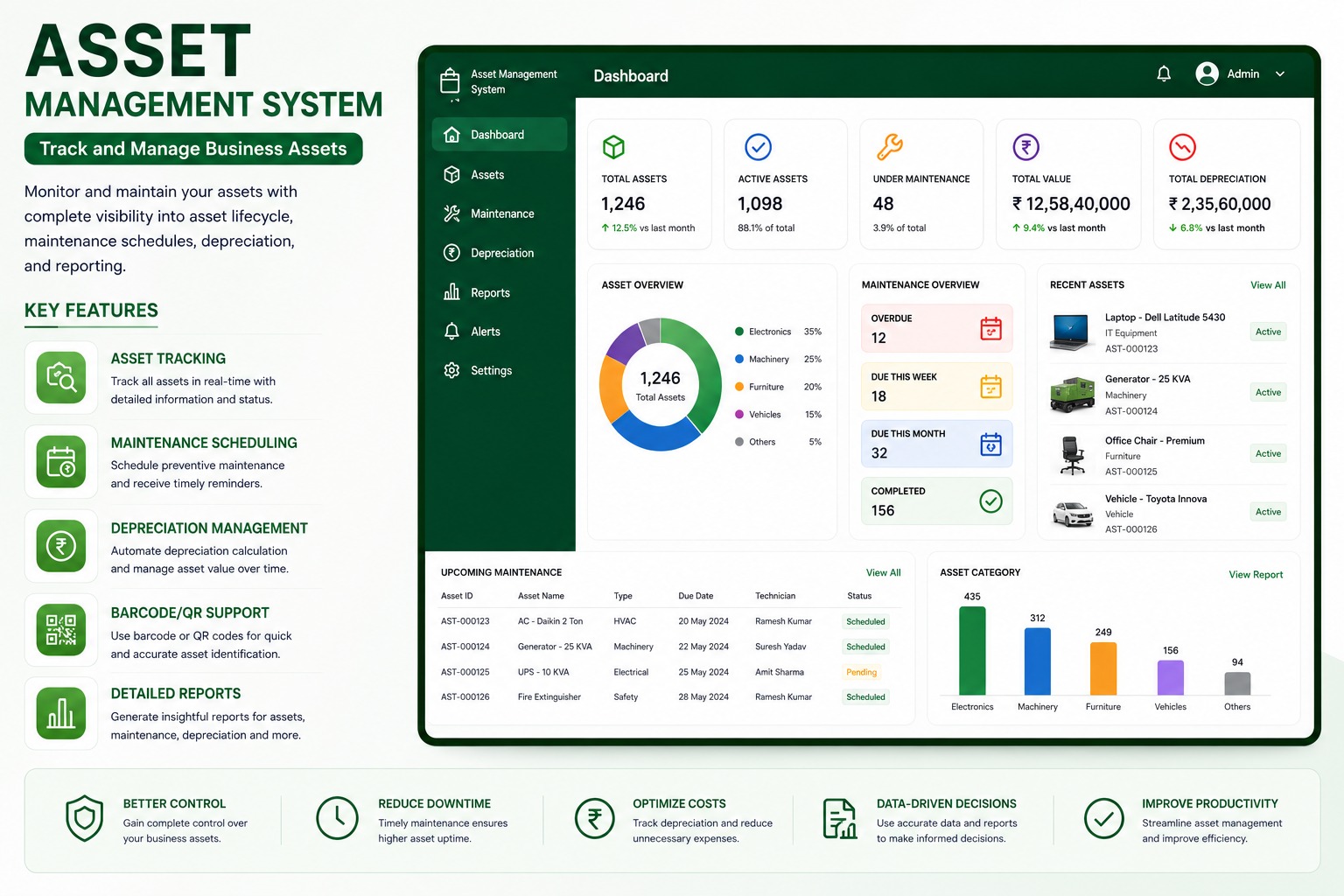
Organizations lose time and money when assets are tracked through spreadsheets, emails, and informal handover notes. An asset management system centralizes asset records, ownership, maintenance, documents, and movement history.
Centralized Asset Records
Each asset can be recorded with category, serial number, purchase details, warranty, location, assigned user, condition, current status, and supporting documents. This gives teams one reliable source for asset information.
Assignment And Movement Tracking
The system can track when an asset is assigned, returned, transferred, repaired, retired, or disposed. Managers can quickly see where an asset is located and who is responsible for it.
Useful Controls
- QR and barcode based identification
- Employee-wise and location-wise asset visibility
- Preventive maintenance scheduling
- Depreciation and asset value tracking
- Audit trails for transfers and changes
Better Compliance And Audits
Audit teams can review asset history, documents, maintenance records, and verification status without searching across multiple files. This improves accountability and reduces missing asset risk.
Explore the Asset Management System
Track physical and IT assets, maintenance, depreciation, and lifecycle history from one central system.
Asset Management System FAQs: Features, Workflows & Best Practices
Comprehensive answers to frequently asked technical, operational, and implementation questions about asset management system in India.
What is an Asset Management System software and how does it help organizations?
An Asset Management System is an enterprise software designed to record, track, assign, monitor, and manage physical and IT assets throughout their entire lifecycle. It provides centralized visibility over computers, machinery, office equipment, vehicles, and tools, reducing asset loss, preventing unrecorded transfers, and automating compliance.
How does this asset tracking software perform better than managing assets in Excel spreadsheets?
Unlike static Excel spreadsheets that lack user accountability and real-time synchronization, our automated asset management software provides real-time location tracking, automated check-in/check-out workflows, preventive maintenance reminders, depreciation calculations, audit logs, and role-based permissions.
Does the asset management software support QR codes and barcode scanning for asset tagging?
Yes. Every asset can be assigned an auto-generated unique asset code, QR code, or barcode label. Teams can quickly scan tags using mobile devices or barcode scanners during audits, routine inspections, checkouts, and departmental transfers.
Can the system track both IT hardware and non-IT physical machinery assets?
Yes. The system is flexible and manages IT assets (laptops, monitors, servers, networking gear, software licenses) as well as non-IT assets (plant machinery, lab equipment, office furniture, vehicles, tools, and medical apparatus) across multiple branches.
How does the software handle employee exit handovers and asset recoveries?
When an employee resigns or transfers departments, HR and IT administrators can instantly pull a consolidated list of all company assets assigned to their profile. Assets can be systematically returned, verified, and reassigned to prevent unreturned hardware.
Does the system automate preventive maintenance scheduling and service tracking?
Yes. The system allows maintenance teams to configure scheduled servicing intervals, calibration dates, warranty expiration alerts, and AMC tracking, which minimizes unexpected machine breakdowns and downtime costs.
How does the software calculate asset depreciation and current book value?
The system supports standard depreciation methods (such as Straight Line Method - SLM and Written Down Value - WDV) to automatically calculate accumulated depreciation, salvage value, and net book value for accurate financial reporting.
Can multi-location enterprises and departmental branches manage assets centrally?
Yes. The software supports multi-branch, multi-department, and multi-warehouse hierarchies. Corporate management gets consolidated enterprise-wide asset reports while individual branch managers access location-specific asset registries.
What audit trails, asset verification, and compliance reports are available in the system?
The system maintains a tamper-proof audit trail for every asset change—including purchase date, cost center, physical condition, custodian changes, repair histories, and write-offs. Audit teams can export compliance-ready reports with a single click.
How can an organization import existing asset records and serial numbers from Excel into the software?
The system includes an intuitive bulk import tool with an approved Excel template. The importer automatically validates required fields, checks for duplicate serial numbers or asset tags, and maps categories before completing the migration.
Have more questions about implementing Asset Management System for your organization?
Explore Official Asset Management System Page -> Speak With Our Solution Experts