
Sales to ERP Workflow Automation
Capture sales orders, validate order data, transform it into ERP format, and push it to SAP, Oracle, Tally, or Dynamics.
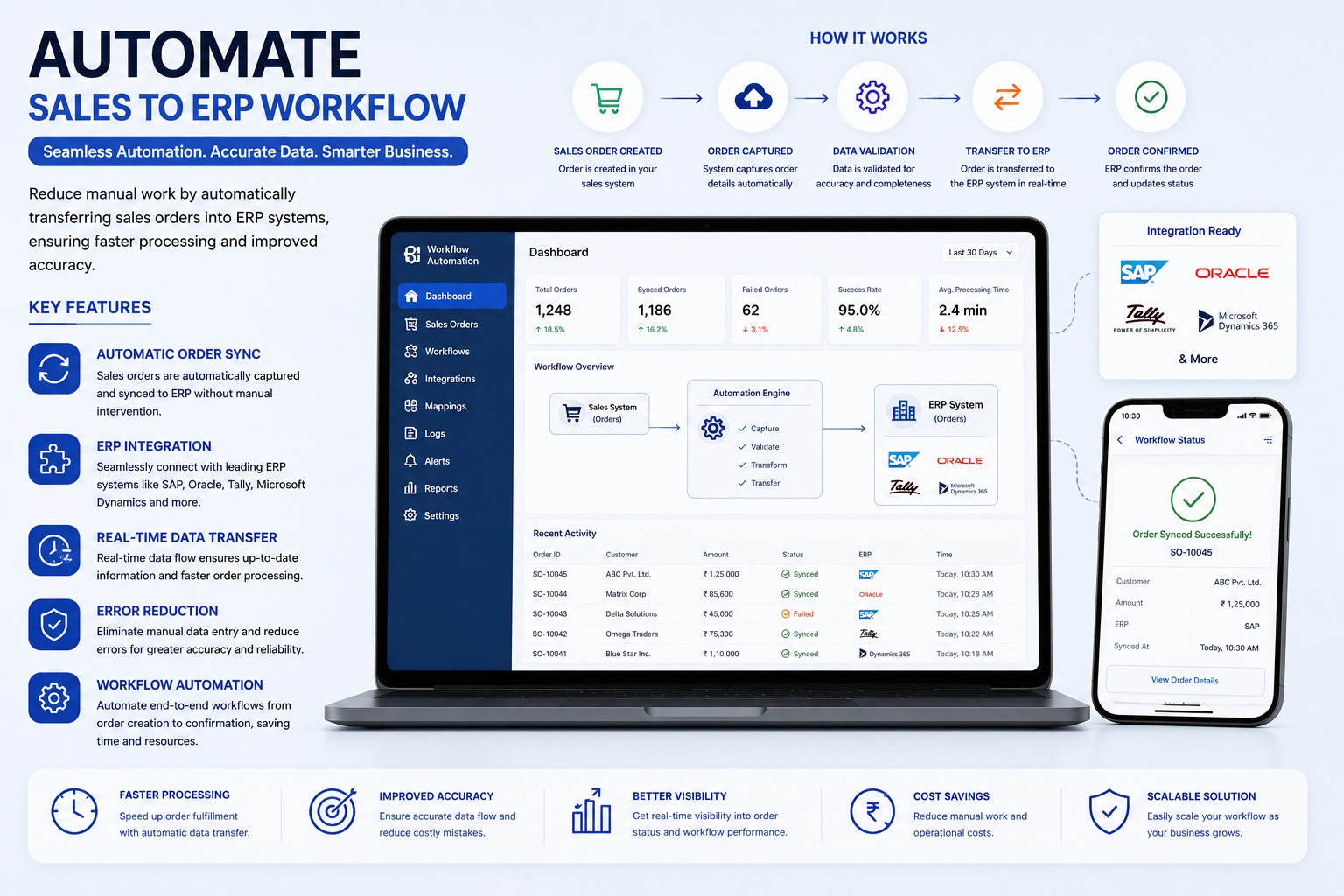
Core Robot Capabilities
Eliminates mundane keystrokes, data validation mismatches, and delayed exports.
Automatic order capture
Executes via scheduled background daemon or trigger-based queues with exception handling and email alerts.
Customer, item, amount, and tax validation
Executes via scheduled background daemon or trigger-based queues with exception handling and email alerts.
ERP data transfer
Executes via scheduled background daemon or trigger-based queues with exception handling and email alerts.
Synced, failed, and pending status tracking
Executes via scheduled background daemon or trigger-based queues with exception handling and email alerts.
Manual-entry error reduction
Executes via scheduled background daemon or trigger-based queues with exception handling and email alerts.
Shared workflow visibility
Executes via scheduled background daemon or trigger-based queues with exception handling and email alerts.
Systems, ERPs & Portals Connected
This automation bot connects seamlessly with the following target software environments:
Technical & Implementation Q&A (20 Answers)
Learn how this bot operates without breaking security, how errors are routed, and timeline for production deployment.
What is Sales to ERP Workflow Automation and how does it accelerate customer order dispatch?▾
Sales to ERP Workflow Automation is an end-to-end integration solution that captures confirmed customer sales orders from front-end sales channels (CRM, mobile sales apps, B2B dealer portals, e-commerce websites, or EDI) and automatically validates, maps, and creates sales orders (such as VA01 in SAP) in the ERP.
Which sales channels and ordering platforms can be synchronized into the central ERP?▾
The automation connects with leading CRM platforms (Salesforce, HubSpot, custom CRMs), B2B dealer/distributor ordering apps, e-commerce marketplaces (Shopify, WooCommerce, Amazon), EDI feeds, and structured Excel/CSV order batches sent via email.
How does the workflow validate customer master data, pricing tiers, and real-time inventory before ERP creation?▾
Upon receiving an order, the system validates customer credit limits, checks customer-specific pricing contracts or discount matrices, verifies real-time stock availability in the assigned shipping plant, and validates shipping address master data prior to posting.
What happens if product SKU codes in the sales platform differ from ERP material master numbers?▾
The solution includes an intelligent SKU translation cross-reference table that automatically maps external product codes, dealer part numbers, or barcode identifiers to internal ERP material master codes without requiring manual intervention.
How does the system handle customer credit limit breaches and automated sales approval holds?▾
If a customer's order pushes outstanding receivables beyond their approved credit threshold, the automation creates the order under a "Credit Block / Manager Review" status in the ERP and dispatches an automated notification to the finance manager.
How does real-time sales order sync eliminate manual order transcription errors and delivery delays?▾
Manual re-typing of orders between systems frequently leads to incorrect quantities, wrong item variants, delivery address errors, and processing backlogs. Automated synchronization processes orders within seconds with 100% data fidelity.
Are automated order status updates and dispatch notifications communicated back to sales reps and clients?▾
Yes. Once the ERP generates the official Sales Order number, Delivery Note, or Invoice, the automation syncs tracking information and shipment status back to the CRM and sends automated WhatsApp/SMS alerts to the client.
How does the system manage order amendments, cancellations, backorders, and partial line fulfillment?▾
If an item is out of stock or partially available, the workflow can split orders, generate backorder notifications, or trigger configured business workflows for partial shipment, keeping both the buyer and warehouse aligned.
Does the automation record complete transaction logs and error notification alerts for IT administrators?▾
Yes. Every transaction payload, mapping timestamp, ERP response code, and generated document number is recorded in a centralized monitoring dashboard with automated email/Slack alerts for any failed sync attempts.
Which ERP platforms (SAP ECC, S/4HANA, Microsoft Dynamics, Tally, Zoho) can be integrated?▾
The workflow is built on standardized REST/SOAP APIs and enterprise connectors supporting SAP ECC, SAP S/4HANA, Microsoft Dynamics 365, Oracle NetSuite, Tally Prime, Zoho Books, and bespoke legacy ERP systems.
Can orders requiring approval be stopped before they reach the ERP?▾
Yes. Orders can be routed for approval based on discount percentage, order value, credit limit, product type, customer category, or other business rules.
Can the system check a customer’s credit limit before processing the order?▾
Yes. The workflow can retrieve the customer’s credit limit, outstanding balance, and payment status from the ERP and hold orders that exceed the permitted limit.
What happens if the ERP is unavailable when the order is being transferred?▾
The order can remain in a pending or failed status and be retried automatically or manually when the ERP connection becomes available. It does not need to be entered again from the beginning.
Can we see which orders were synced successfully and which ones failed?▾
Yes. The dashboard can show total orders, successful orders, failed orders, pending orders, processing time, and ERP sync status in real time.
How will users know why an order failed?▾
Each failed order can display a specific reason, such as connection failure, missing master data, incorrect mapping, invalid tax details, insufficient stock, or ERP validation error.
Can we correct a failed order and process it again?▾
Yes. Authorized users can review the error, correct the source data or mapping, and retry only the failed order without affecting successfully processed orders.
Can changes made to an order be synchronized with the ERP?▾
Yes. Depending on the configured workflow and ERP rules, approved changes such as quantity, price, delivery date, or address can be updated before the order reaches a restricted processing stage.
Can order confirmation or ERP status be sent back to the sales system?▾
Yes. After successful processing, the ERP order number, sync status, confirmation time, failure message, or fulfilment status can be sent back to the original sales application.
Can management track who created, changed, approved, or retried an order?▾
Yes. The system can maintain an audit trail containing the user, activity, date, time, previous status, updated status, and ERP response.
How does Sales-to-ERP Workflow Automation benefit the business?▾
It reduces manual work, duplicate entry, order delays, and processing errors. It also provides faster fulfilment, accurate ERP data, real-time visibility, lower operating costs, and a scalable process as order volumes grow.
Read the Complete Bot Engineering Story
Learn how this automation was conceived, the edge cases handled, and the audited efficiency gains.
Connect With Our Engineering Desk
Speak directly with our automation consultants about robotic process automation, ERP rollout feasibility, or custom Flutter platforms.
Direct Call & WhatsApp
+91 87226 29900Cloud & Google Desk
+91 83905 00190Direct Official Email
customerdelight@bhar.co.inBlue Horizon Automation Research Pvt. Ltd. (BHAR India)
Office No. 26/27, 3rd Floor, Matru Chhaya Apartment,
Opp. Kapeesh Mall, MG Road, Mulund West,
Mumbai, Maharashtra – 400080
Send a Direct Enquiry
Inquiries are logged directly into Firestore and delivered to our senior engineering desk.