
Retail POS System
Retail billing, barcode scanning, inventory updates, receipts, multi-payment support, and daily sales reporting.
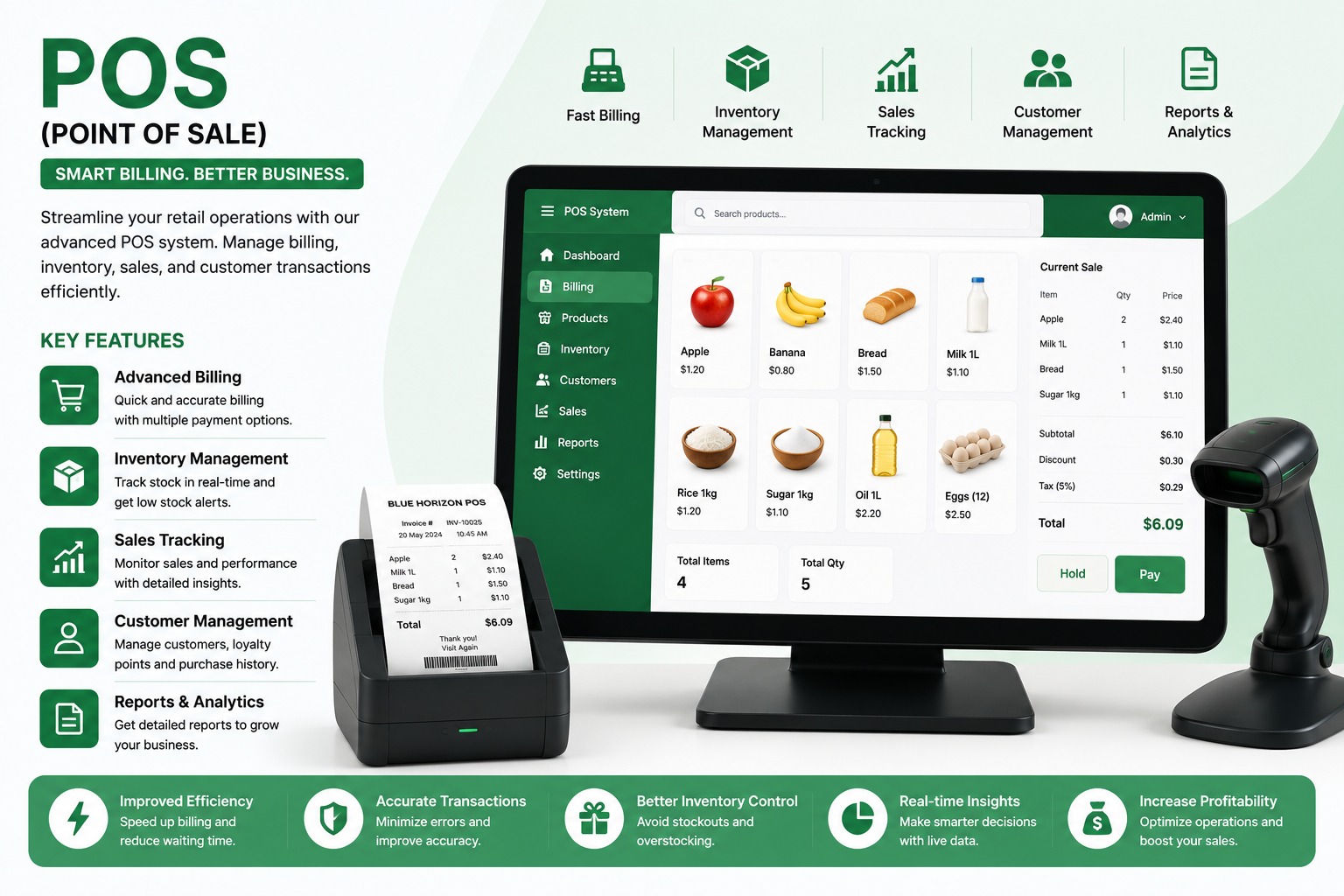
Key Operational Modules
Engineered to streamline workflows and provide real-time managerial visibility.
Fast checkout and billing
Designed to eliminate scattered spreadsheets, reduce human error, and accelerate turnaround across all user touchpoints.
Barcode product search
Designed to eliminate scattered spreadsheets, reduce human error, and accelerate turnaround across all user touchpoints.
Inventory and low-stock alerts
Designed to eliminate scattered spreadsheets, reduce human error, and accelerate turnaround across all user touchpoints.
Cash, UPI, card, and wallet payments
Designed to eliminate scattered spreadsheets, reduce human error, and accelerate turnaround across all user touchpoints.
Receipt printing
Designed to eliminate scattered spreadsheets, reduce human error, and accelerate turnaround across all user touchpoints.
Multi-store user and product control
Designed to eliminate scattered spreadsheets, reduce human error, and accelerate turnaround across all user touchpoints.
Industries & Best Fit Operations
This software suite is tailored out-of-the-box for the following industry verticals:
Technical & Implementation Q&A (20 Answers)
Common questions regarding architecture, security, customization, and data migration.
What is a Retail POS System and how does it speed up customer checkout times?▾
A Retail POS System is a fast counter billing and store management software that connects barcode scanning, automated pricing, real-time stock deduction, payment processing, and GST receipt generation into an effortless 5-second checkout workflow.
Can products be scanned and billed rapidly using standard 1D and 2D barcode scanners?▾
Yes. Cashiers can scan manufacturer UPC/EAN barcodes or custom in-house generated barcode labels using handheld laser or 2D QR scanners. The system also supports quick keyword searches and touch-screen hotkeys for items without barcodes.
How does the retail software synchronize inventory and warehouse stock in real time?▾
Every time an item is billed at the checkout counter, current stock levels are automatically decremented. The system prevents overselling, tracks stock batches, manages expiration dates, and supports inter-branch stock transfers.
Can the system generate automated low-stock warnings and purchase reorder suggestions?▾
Yes. Store managers can configure minimum safety thresholds for each SKU. When stock dips below the threshold, the system triggers low-stock alerts and auto-generates draft purchase orders for suppliers.
Does the retail POS support split payments across multiple payment methods?▾
Yes. Customers can split a single bill across multiple tender types—for example, paying partly in cash and the balance via UPI QR code, credit card, store credit note, or customer loyalty reward points.
How does the software handle sales returns, customer exchanges, and credit notes?▾
Cashiers can look up original purchase receipts by invoice number or customer mobile number. The system processes item returns, automatically adds items back into inventory, and issues credit notes or refunds with audit verification.
Can promotional discount rules, buy-one-get-one (BOGO) offers, and loyalty schemes be configured?▾
Yes. The system includes an agile promotions engine supporting percentage discounts, threshold discounts (e.g., "Spend ₹2000, get ₹200 off"), BOGO combos, festival pricing, and customer reward points per spend.
Does the software generate GST-compliant retail tax invoices and daily sales closing reports?▾
Yes. The system prints compliant B2C and B2B GST tax invoices with HSN summaries and generates daily Z-Reports summarizing cash drawer balances, card collections, UPI settlements, discounts given, and net taxable sales.
How easily can a supermarket or retail store bulk upload thousands of product SKUs and prices from Excel?▾
Store owners can import entire product catalogs containing thousands of SKUs, barcodes, HSN codes, MRPs, cost prices, selling rates, and opening quantities in minutes using our standardized Excel/CSV import utility.
Can the retail POS software handle multiple checkout counters and multi-store retail chains?▾
Yes. It supports multi-till counter operations with independent cashier shift reconciliation, as well as centralized multi-store management with unified pricing, centralized loyalty programs, and cross-store stock visibility.
Can the system alert us when stock is running low?▾
Yes. Minimum stock levels can be set for products. The system can then show low-stock alerts so the business can reorder products before they run out.
Can we prevent billing when a product is out of stock?▾
Yes. The system can restrict the sale of out-of-stock products or display a warning, depending on the business rules.
Can we manage product returns and refunds?▾
Yes. Products can be returned against the original invoice. The system can update stock, calculate the refundable amount, and record the reason and user who processed the return.
Can we track daily and monthly sales?▾
Yes. The sales dashboard and reports can show daily, weekly, monthly, or custom date-range sales. Users can view total revenue, order count, average bill value, and payment-mode collections.
Can we see which products are selling the most?▾
Yes. Product-wise and category-wise reports can identify top-selling, slow-moving, high-revenue, and low-performing products.
Can we maintain customer details and purchase history?▾
Yes. Customer profiles can store names, mobile numbers, addresses, loyalty points, credit balances, and complete purchase history.
Can the system support loyalty points or customer rewards?▾
Yes. Loyalty points can be awarded based on purchases and redeemed during future transactions, depending on the configured loyalty program.
Can managers control what each employee can access?▾
Yes. Roles and permissions can be created for Admin, Manager, Cashier, Inventory User, Accountant, and other employees. Access to discounts, refunds, reports, stock changes, and settings can be restricted.
What reports are available in the POS system?▾
Important reports can include sales reports, product-wise sales, category-wise sales, payment summary, inventory report, low-stock report, customer purchase report, discount report, refund report, tax report, and employee performance report.
How does the POS system help improve business profitability?▾
The POS reduces billing errors, speeds up customer service, provides real-time stock visibility, prevents stock shortages, tracks sales trends, controls discounts and refunds, and gives management accurate reports for better business decisions.
Read the Complete Architecture Guide
Learn the technical nuances, failover recovery strategies, and operational metrics in our in-depth blog post.
Connect With Our Engineering Desk
Speak directly with our automation consultants about robotic process automation, ERP rollout feasibility, or custom Flutter platforms.
Direct Call & WhatsApp
+91 87226 29900Cloud & Google Desk
+91 83905 00190Direct Official Email
customerdelight@bhar.co.inBlue Horizon Automation Research Pvt. Ltd. (BHAR India)
Office No. 26/27, 3rd Floor, Matru Chhaya Apartment,
Opp. Kapeesh Mall, MG Road, Mulund West,
Mumbai, Maharashtra – 400080
Send a Direct Enquiry
Inquiries are logged directly into Firestore and delivered to our senior engineering desk.