
POS + Captain System
Advanced POS and captain panel for restaurants, cafes, counters, staff control, live orders, billing, and sales reports.
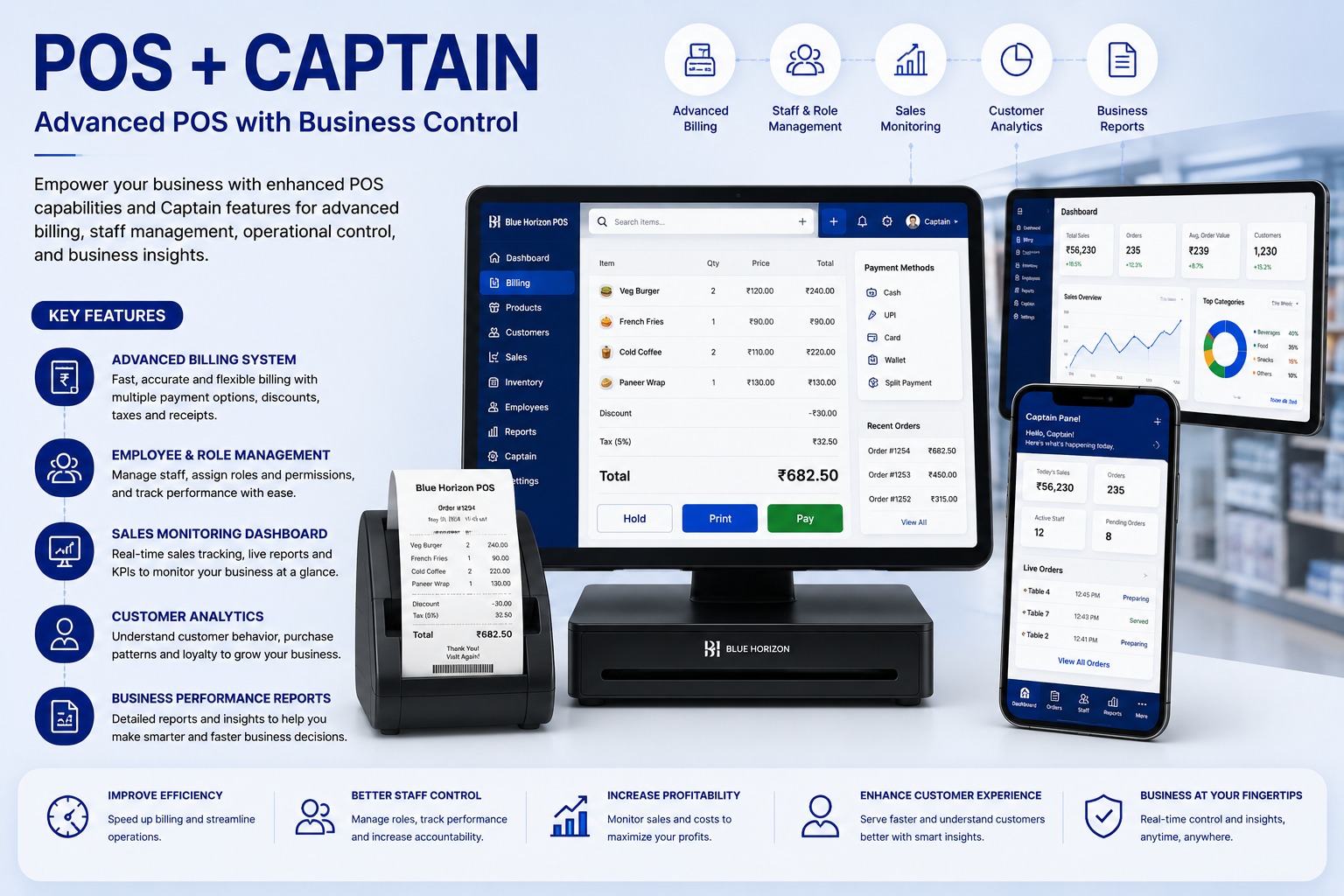
Key Operational Modules
Engineered to streamline workflows and provide real-time managerial visibility.
Fast billing with discounts, taxes, and payment modes
Designed to eliminate scattered spreadsheets, reduce human error, and accelerate turnaround across all user touchpoints.
Captain panel for live orders
Designed to eliminate scattered spreadsheets, reduce human error, and accelerate turnaround across all user touchpoints.
Staff roles and permissions
Designed to eliminate scattered spreadsheets, reduce human error, and accelerate turnaround across all user touchpoints.
Sales monitoring
Designed to eliminate scattered spreadsheets, reduce human error, and accelerate turnaround across all user touchpoints.
Customer analytics
Designed to eliminate scattered spreadsheets, reduce human error, and accelerate turnaround across all user touchpoints.
Receipt printing and reports
Designed to eliminate scattered spreadsheets, reduce human error, and accelerate turnaround across all user touchpoints.
Industries & Best Fit Operations
This software suite is tailored out-of-the-box for the following industry verticals:
Technical & Implementation Q&A (20 Answers)
Common questions regarding architecture, security, customization, and data migration.
What is a POS + Captain System and how does it elevate restaurant operational efficiency?▾
A POS + Captain System combines a centralized restaurant billing counter with mobile order-taking applications for table captains and waitstaff. Captains take food orders tableside on handheld devices, instantly dispatching digital Kitchen Order Tickets (KOT) directly to the kitchen.
How does the digital captain ordering app eliminate order delays and communication mistakes?▾
Instead of handwriting paper slips and walking to the kitchen, captains enter orders tableside with specific cooking preferences. KOTs print instantly on kitchen thermal printers or display on Kitchen Display Screens (KDS), speeding up preparation.
Can the restaurant POS manage table layouts, reservations, table merging, and bill splitting?▾
Yes. The software features an interactive visual floor plan showing real-time table statuses (Vacant, Seated, Order Placed, Billed). It supports table reservation booking, table merging for large groups, and bill splitting by seat or item.
Which payment modes are supported at the checkout billing counter?▾
The POS supports fast multi-tender settlements including Dynamic UPI QR codes (GPay, PhonePe, Paytm), credit/debit cards, cash, dining gift cards, loyalty points, and corporate billing accounts.
How does the system prevent unauthorized billing discounts, item cancellations, and revenue pilferage?▾
Every KOT cancellation, item modification, complimentary food punch, or bill discount requires manager authorization with a mandatory reason code. Comprehensive audit logs track all voided transactions.
Can waitstaff add custom food modifiers, preparation notes, and spice level instructions?▾
Yes. Waitstaff can easily select pre-set item modifiers (e.g., "Less Spicy", "No Onion/Garlic", "Extra Cheese", "Gluten Free") or type custom kitchen instructions that print highlighted directly on the chef's KOT.
Does the POS support statutory restaurant GST compliance and thermal receipt printing?▾
Yes. The system automatically computes CGST, SGST, service charges, and cess in accordance with statutory tax rules and prints clean tax invoices on standard 2-inch and 3-inch ESC/POS thermal printers.
Can restaurant owners and managers track live sales, covers, and inventory consumption remotely?▾
Yes. Owners can log into a cloud manager dashboard from any browser or smartphone to view live sales numbers, table turnaround times, category-wise revenue, and daily payment settlement reports in real time.
Does the captain ordering and billing system continue to function if internet connectivity goes down?▾
Yes. The POS and captain network can operate smoothly on an internal local area network (LAN/Wi-Fi), ensuring that order punching, KOT printing, and customer billing continue uninterrupted during internet outages.
Is this POS and captain solution customizable for cafes, fine-dining restaurants, QSRs, and restrobars?▾
Yes. The software easily adapts its interface and workflows for diverse food service formats, including fine dining table service, quick-service counters (QSR), casual cafes, restrobars with liquor inventory, and cloud delivery kitchens.
Can management see who created, edited, cancelled, or discounted a bill?▾
Yes. The system can maintain an activity trail showing the user, action, date, time, and bill details. This helps management identify unauthorized discounts, cancellations, or billing changes.
Can we monitor daily sales in real time?▾
Yes. The dashboard can show total sales, number of orders, average bill value, payment-mode collections, top-selling items, and other important figures for the selected day or date range.
Can the system show which products are selling the most or least?▾
Yes. Product-wise reports can identify top-selling, slow-moving, low-performing, and high-revenue items. This helps management improve pricing, promotions, and menu planning.
Can we view sales performance by employee or captain?▾
Yes. Employee-wise and captain-wise reports can show orders handled, sales value, average order amount, cancellations, discounts, and performance during a selected period.
Can we manage customer details and purchase history?▾
Yes. Customer profiles can store name, mobile number, address, order history, preferred items, total purchases, and other relevant information. This helps provide faster and more personalized service.
Can the system help us understand repeat customers and customer behaviour?▾
Yes. Customer analytics can show repeat visits, purchase frequency, average spending, preferred products, and high-value customers. This information can support loyalty programs and targeted offers.
What business reports are available?▾
Important reports can include daily sales, item-wise sales, category-wise sales, payment-mode summary, employee performance, discount report, cancelled bill report, customer analysis, tax summary, and profit-related reports.
Can reports be filtered and exported?▾
Yes. Reports can be filtered by date, outlet, employee, captain, product, category, payment mode, or order type. Depending on the system configuration, they can also be exported to Excel or PDF.
Can the system work across multiple counters or outlets?▾
Yes. Multiple billing counters, devices, users, and branches can be managed in one system. Access and reports can be configured outlet-wise or combined for overall management.
How does this system help increase profitability and improve control?▾
The system reduces billing errors, improves order speed, tracks staff activity, highlights sales trends, controls discounts and cancellations, and provides accurate performance reports. These insights help management control costs, improve service, and make better business decisions.
Read the Complete Architecture Guide
Learn the technical nuances, failover recovery strategies, and operational metrics in our in-depth blog post.
Connect With Our Engineering Desk
Speak directly with our automation consultants about robotic process automation, ERP rollout feasibility, or custom Flutter platforms.
Direct Call & WhatsApp
+91 87226 29900Cloud & Google Desk
+91 83905 00190Direct Official Email
customerdelight@bhar.co.inBlue Horizon Automation Research Pvt. Ltd. (BHAR India)
Office No. 26/27, 3rd Floor, Matru Chhaya Apartment,
Opp. Kapeesh Mall, MG Road, Mulund West,
Mumbai, Maharashtra – 400080
Send a Direct Enquiry
Inquiries are logged directly into Firestore and delivered to our senior engineering desk.