
Clinic Management System
Digitize patient registration, appointments, EMR records, billing, prescriptions, reports, and clinic operations.
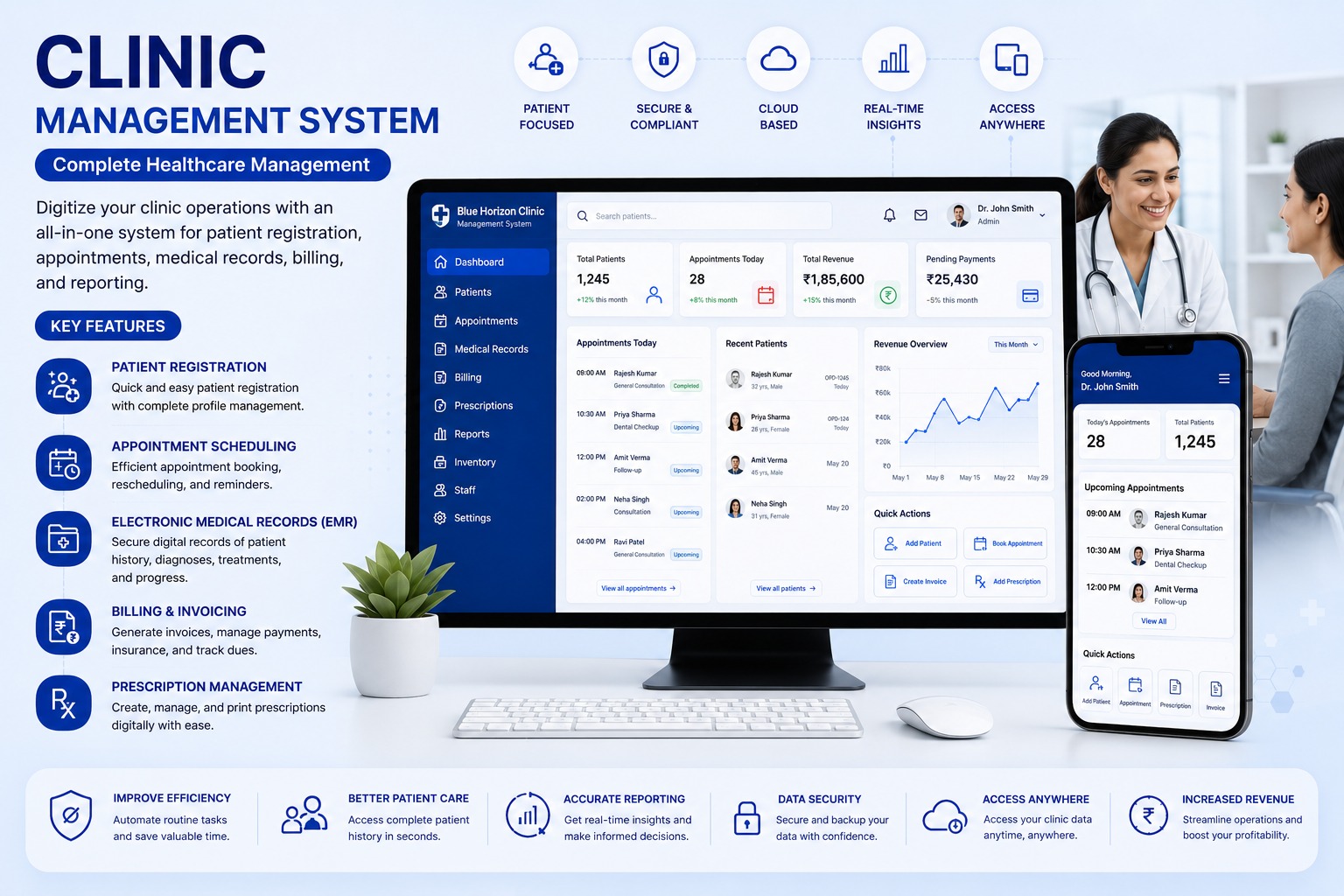
Key Operational Modules
Engineered to streamline workflows and provide real-time managerial visibility.
Patient profiles and visit history
Designed to eliminate scattered spreadsheets, reduce human error, and accelerate turnaround across all user touchpoints.
Doctor-wise appointment scheduling
Designed to eliminate scattered spreadsheets, reduce human error, and accelerate turnaround across all user touchpoints.
Electronic medical records
Designed to eliminate scattered spreadsheets, reduce human error, and accelerate turnaround across all user touchpoints.
Billing and pending dues tracking
Designed to eliminate scattered spreadsheets, reduce human error, and accelerate turnaround across all user touchpoints.
Digital prescriptions
Designed to eliminate scattered spreadsheets, reduce human error, and accelerate turnaround across all user touchpoints.
Clinic performance dashboard
Designed to eliminate scattered spreadsheets, reduce human error, and accelerate turnaround across all user touchpoints.
Industries & Best Fit Operations
This software suite is tailored out-of-the-box for the following industry verticals:
Technical & Implementation Q&A (20 Answers)
Common questions regarding architecture, security, customization, and data migration.
What is a Clinic Management System and how does it optimize OPD clinic operations?▾
A Clinic Management System is an all-in-one healthcare software platform designed for doctors, polyclinics, and outpatient healthcare centers. It digitizes patient registration, doctor appointment scheduling, token queues, electronic medical records (EMR), prescription writing, and billing.
How does the appointment scheduling module manage doctor time slots and patient waiting queues?▾
The system provides an intuitive calendar for scheduling in-person and teleconsultation slots, supports walk-in token generation, and updates live queue status on reception displays to reduce patient waiting room congestion.
What features are included in the Electronic Medical Records (EMR) module?▾
The EMR module allows healthcare providers to securely record patient vital signs, chief complaints, clinical diagnoses, medical history, past allergies, diagnostic lab findings, and treatment progress notes in a searchable longitudinal chart.
Can doctors create and print branded digital prescriptions with custom medicine dosages?▾
Yes. Doctors can quickly generate digital prescriptions using pre-configured medicine databases, dosage frequency templates (e.g., 1-0-1 after meals), investigation orders, and dietary advice. Prescriptions can be printed or sent to patients via WhatsApp.
How does clinic billing handle consultation charges, procedures, and GST tax invoices?▾
The billing engine handles consultation fees, diagnostic test charges, procedure costs, and medicine bills with customizable discounts, split payment options (Cash, UPI QR, Cards), and GST-compliant printable invoices.
Can patients receive automated SMS or WhatsApp appointment confirmations and visit reminders?▾
Yes. The system automatically sends automated confirmation messages upon booking, reminder alerts before scheduled appointment slots, and post-consultation follow-up reminders, drastically cutting patient no-show rates.
Can the software support multiple doctors, visiting specialists, and departmental schedules?▾
Yes. Polyclinics and specialty centers can manage separate consultation schedules, fee structures, and commission splits for resident doctors, visiting specialists, and diagnostic technicians.
How does the clinic management software safeguard patient data privacy and medical confidentiality?▾
The software uses encrypted cloud storage, role-based access restrictions, and secure login authentication ensuring that sensitive clinical diagnoses and patient health histories are accessible only to authorized medical personnel.
Can diagnostic laboratory reports, ultrasound scans, and X-ray images be attached to patient profiles?▾
Yes. Receptionists or lab technicians can attach PDF test reports, scanned documents, and medical imaging files directly to the patient's digital medical file for instant clinical review during future consultations.
Does the clinic management software support multi-branch clinics and diagnostic chains?▾
Yes. Multi-location clinic chains can operate under one central platform. Patient records remain accessible across branches with centralized revenue, doctor consultation, and inventory analytics.
Can doctors access a patient's previous consultation history?▾
Yes. Authorized doctors can view previous diagnoses, prescriptions, test reports, treatment notes, and progress before starting the current consultation.
Is patient medical information secure?▾
Yes. Access can be controlled through user roles and permissions. Sensitive medical records can be restricted to authorized doctors, staff members, and administrators.
Can test reports and medical documents be uploaded to the patient record?▾
Yes. Lab reports, scans, discharge summaries, previous prescriptions, images, and other documents can be uploaded and linked to the patient profile.
Can the clinic generate bills immediately after consultation?▾
Yes. The system can create invoices for consultation fees, procedures, tests, medicines, and other services. Applicable discounts, taxes, and payment details can also be included.
Can the system manage partial payments and pending dues?▾
Yes. The clinic can record full, partial, advance, or multiple payments. The system can show the total bill, amount received, balance due, and payment history.
Can we generate and print invoices or payment receipts?▾
Yes. Invoices and receipts can be generated using the clinic's name, logo, address, tax details, patient information, service details, and payment summary.
Can insurance details be recorded for patients?▾
Yes. Insurance company, policy number, coverage information, approval status, claim details, and supporting documents can be maintained if insurance management is included.
Can doctors create and print digital prescriptions?▾
Yes. Doctors can select medicines, dosage, frequency, duration, instructions, and follow-up advice. The prescription can then be saved, printed, or shared digitally.
Can frequently used medicines or prescription templates be saved?▾
Yes. Medicine masters and prescription templates can be created so doctors can prepare common prescriptions more quickly while still making patient-specific changes.
Can management view reports for appointments, patients, billing, and doctors?▾
Yes. The system can provide reports for new patients, repeat visits, doctor-wise appointments, cancelled appointments, daily collections, pending dues, payment modes, services, and prescription history. Reports can also be filtered by doctor, date, clinic, and department.
Read the Complete Architecture Guide
Learn the technical nuances, failover recovery strategies, and operational metrics in our in-depth blog post.
Connect With Our Engineering Desk
Speak directly with our automation consultants about robotic process automation, ERP rollout feasibility, or custom Flutter platforms.
Direct Call & WhatsApp
+91 87226 29900Cloud & Google Desk
+91 83905 00190Direct Official Email
customerdelight@bhar.co.inBlue Horizon Automation Research Pvt. Ltd. (BHAR India)
Office No. 26/27, 3rd Floor, Matru Chhaya Apartment,
Opp. Kapeesh Mall, MG Road, Mulund West,
Mumbai, Maharashtra – 400080
Send a Direct Enquiry
Inquiries are logged directly into Firestore and delivered to our senior engineering desk.