
Asset Management System
Track physical and digital assets, maintenance, depreciation, ownership, documents, and lifecycle history from one central system.
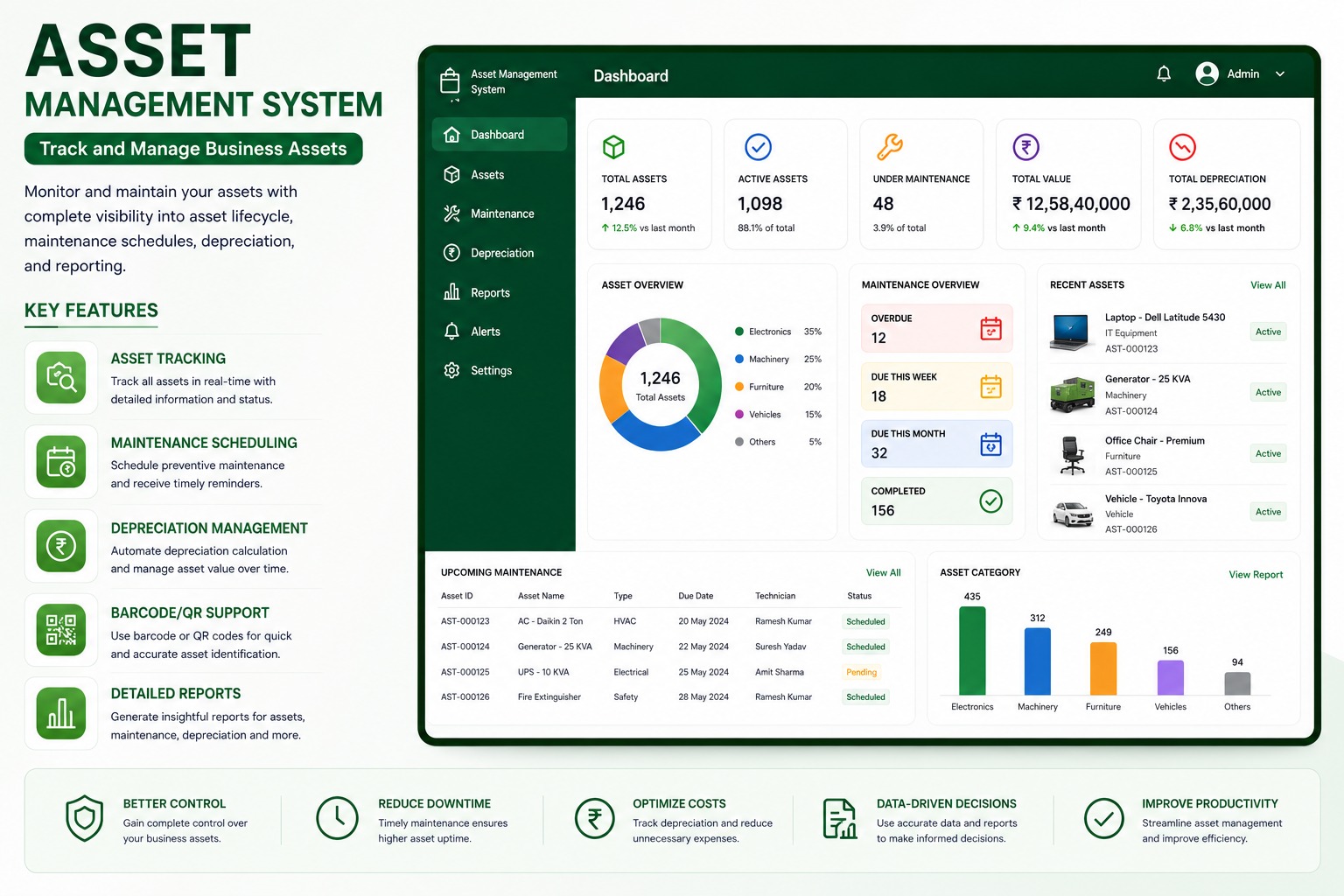
Key Operational Modules
Engineered to streamline workflows and provide real-time managerial visibility.
Asset tracking by category, location, owner, and status
Designed to eliminate scattered spreadsheets, reduce human error, and accelerate turnaround across all user touchpoints.
Preventive maintenance scheduling
Designed to eliminate scattered spreadsheets, reduce human error, and accelerate turnaround across all user touchpoints.
Depreciation and asset value visibility
Designed to eliminate scattered spreadsheets, reduce human error, and accelerate turnaround across all user touchpoints.
QR and barcode identification
Designed to eliminate scattered spreadsheets, reduce human error, and accelerate turnaround across all user touchpoints.
Purchase, transfer, service, and document history
Designed to eliminate scattered spreadsheets, reduce human error, and accelerate turnaround across all user touchpoints.
Reports for utilization, downtime, cost, and compliance
Designed to eliminate scattered spreadsheets, reduce human error, and accelerate turnaround across all user touchpoints.
Industries & Best Fit Operations
This software suite is tailored out-of-the-box for the following industry verticals:
Technical & Implementation Q&A (18 Answers)
Common questions regarding architecture, security, customization, and data migration.
What is an Asset Management System software and how does it help organizations?▾
An Asset Management System is an enterprise software designed to record, track, assign, monitor, and manage physical and IT assets throughout their entire lifecycle. It provides centralized visibility over computers, machinery, office equipment, vehicles, and tools, reducing asset loss, preventing unrecorded transfers, and automating compliance.
How does this asset tracking software perform better than managing assets in Excel spreadsheets?▾
Unlike static Excel spreadsheets that lack user accountability and real-time synchronization, our automated asset management software provides real-time location tracking, automated check-in/check-out workflows, preventive maintenance reminders, depreciation calculations, audit logs, and role-based permissions.
Does the asset management software support QR codes and barcode scanning for asset tagging?▾
Yes. Every asset can be assigned an auto-generated unique asset code, QR code, or barcode label. Teams can quickly scan tags using mobile devices or barcode scanners during audits, routine inspections, checkouts, and departmental transfers.
Can the system track both IT hardware and non-IT physical machinery assets?▾
Yes. The system is flexible and manages IT assets (laptops, monitors, servers, networking gear, software licenses) as well as non-IT assets (plant machinery, lab equipment, office furniture, vehicles, tools, and medical apparatus) across multiple branches.
How does the software handle employee exit handovers and asset recoveries?▾
When an employee resigns or transfers departments, HR and IT administrators can instantly pull a consolidated list of all company assets assigned to their profile. Assets can be systematically returned, verified, and reassigned to prevent unreturned hardware.
Does the system automate preventive maintenance scheduling and service tracking?▾
Yes. The system allows maintenance teams to configure scheduled servicing intervals, calibration dates, warranty expiration alerts, and AMC tracking, which minimizes unexpected machine breakdowns and downtime costs.
How does the software calculate asset depreciation and current book value?▾
The system supports standard depreciation methods (such as Straight Line Method - SLM and Written Down Value - WDV) to automatically calculate accumulated depreciation, salvage value, and net book value for accurate financial reporting.
Can multi-location enterprises and departmental branches manage assets centrally?▾
Yes. The software supports multi-branch, multi-department, and multi-warehouse hierarchies. Corporate management gets consolidated enterprise-wide asset reports while individual branch managers access location-specific asset registries.
What audit trails, asset verification, and compliance reports are available in the system?▾
The system maintains a tamper-proof audit trail for every asset change—including purchase date, cost center, physical condition, custodian changes, repair histories, and write-offs. Audit teams can export compliance-ready reports with a single click.
How can an organization import existing asset records and serial numbers from Excel into the software?▾
The system includes an intuitive bulk import tool with an approved Excel template. The importer automatically validates required fields, checks for duplicate serial numbers or asset tags, and maps categories before completing the migration.
What happens when an employee leaves the company?▾
Before the employee is deactivated, the system can show all assets assigned to them. The assets can then be returned, transferred, or reassigned, ensuring that no company asset remains unaccounted for.
Can one employee be assigned multiple assets?▾
Yes. One employee can have multiple assets such as a laptop, monitor, mobile phone, keyboard, access card, or any other equipment.
Can an asset be assigned to a department instead of an employee?▾
Yes. Shared assets can be assigned to a department, branch, room, location, or project instead of an individual employee.
Can we track the complete history of an asset?▾
Yes. The system records when the asset was added, assigned, returned, transferred, repaired, verified, retired, or disposed of. It also records who performed each action and when.
How do we know whether an asset is available, assigned, damaged, or under repair?▾
Every asset has a current status and condition. Common statuses include Available, Assigned, Under Maintenance, Damaged, Lost, Retired, and Disposed.
Can two assets have the same name?▾
Yes, asset names can be the same, but each asset will have a unique asset code, serial number, barcode, or QR code for identification.
Does the system generate asset codes automatically?▾
Yes. Asset codes can be generated automatically based on the configured numbering format. Manual asset codes can also be supported if required.
Can we upload our existing asset data from Excel?▾
Yes. Existing asset data can be imported using the approved Excel template. The system can validate mandatory fields, duplicates, categories, departments, and date formats before completing the upload.
Read the Complete Architecture Guide
Learn the technical nuances, failover recovery strategies, and operational metrics in our in-depth blog post.
Connect With Our Engineering Desk
Speak directly with our automation consultants about robotic process automation, ERP rollout feasibility, or custom Flutter platforms.
Direct Call & WhatsApp
+91 87226 29900Cloud & Google Desk
+91 83905 00190Direct Official Email
customerdelight@bhar.co.inBlue Horizon Automation Research Pvt. Ltd. (BHAR India)
Office No. 26/27, 3rd Floor, Matru Chhaya Apartment,
Opp. Kapeesh Mall, MG Road, Mulund West,
Mumbai, Maharashtra – 400080
Send a Direct Enquiry
Inquiries are logged directly into Firestore and delivered to our senior engineering desk.