TURNKEY SOFTWARE CATALOG

Ready-to-Deploy Applications

Fully customizable, production-tested software packages deployed in 6-10 weeks with complete source control and dedicated onboarding.

πŸ“¦ PRODUCTION-TESTED SOFTWARE PACKAGES

Turnkey Business Applications

Full-stack enterprise applications deployed in 6–10 weeks with complete source control, role-based security, and zero ongoing per-user license lock-in.

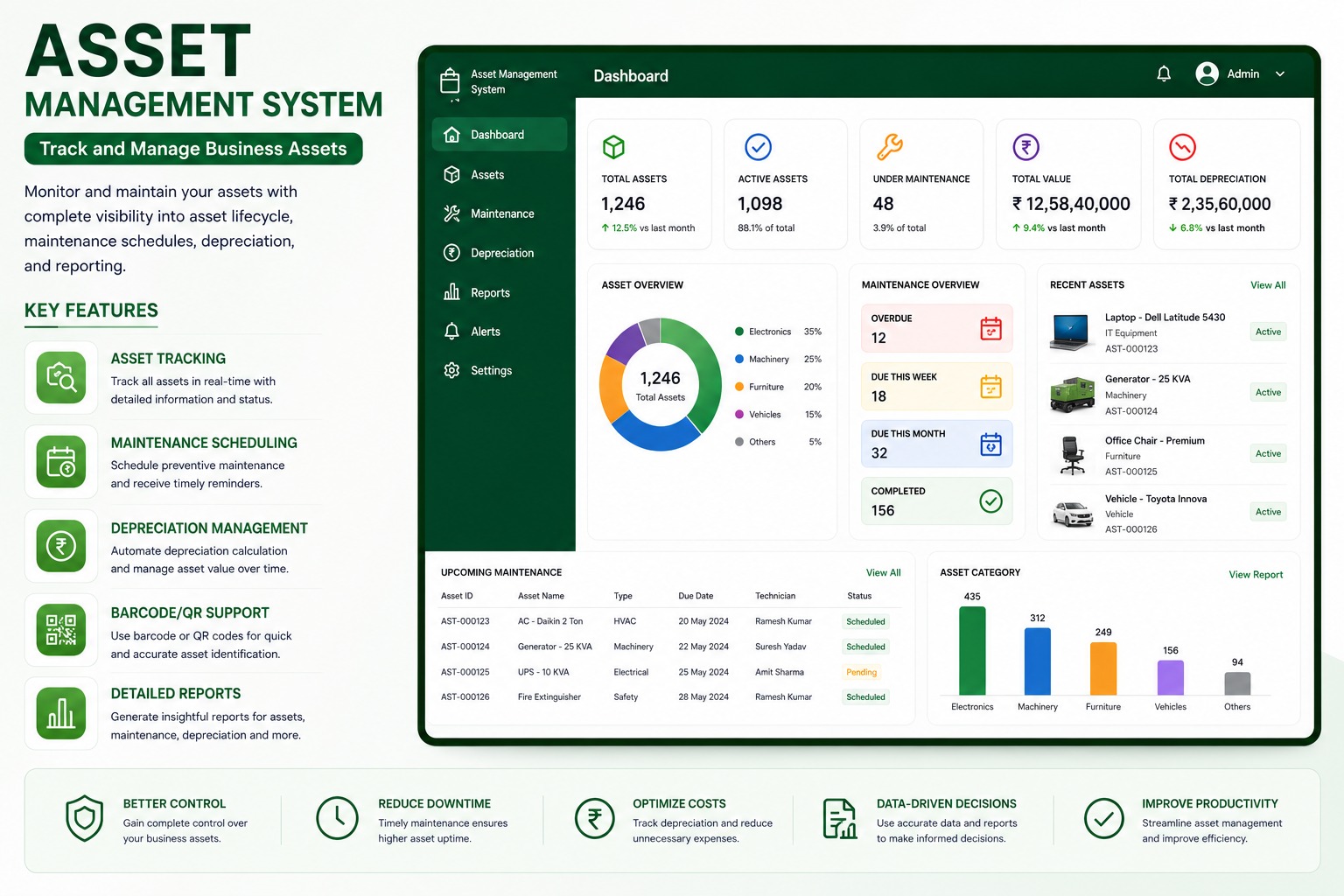
Asset Management System UI Dashboard Screenshot
Business Application
Module #01
Recommended For Industries:
IT CompaniesHospitalsSchools & CollegesManufacturingGovernment BodiesMulti-Location Businesses
6–10 WEEKS DEPLOYMENTβœ“ Production Ready

Asset Management System

Track physical and digital assets, maintenance, depreciation, ownership, documents, and lifecycle history from one central system.

Core Operational Modules & Features:

βœ“Asset tracking by category, location, owner, and status
βœ“Preventive maintenance scheduling
βœ“Depreciation and asset value visibility
βœ“QR and barcode identification
βœ“Purchase, transfer, service, and document history
βœ“Reports for utilization, downtime, cost, and compliance
Technical & Architectural Q&A (18 FAQs Available):
What is an Asset Management System software and how does it help organizations?β–Ύ

An Asset Management System is an enterprise software designed to record, track, assign, monitor, and manage physical and IT assets throughout their entire lifecycle. It provides centralized visibility over computers, machinery, office equipment, vehicles, and tools, reducing asset loss, preventing unrecorded transfers, and automating compliance.

How does this asset tracking software perform better than managing assets in Excel spreadsheets?β–Ύ

Unlike static Excel spreadsheets that lack user accountability and real-time synchronization, our automated asset management software provides real-time location tracking, automated check-in/check-out workflows, preventive maintenance reminders, depreciation calculations, audit logs, and role-based permissions.

Property Dealer Management System UI Dashboard Screenshot
Business Application
Module #02
Recommended For Industries:
Property DealersBrokersBuildersReal Estate TeamsChannel PartnersConsultants
6–10 WEEKS DEPLOYMENTβœ“ Production Ready

Property Dealer Management System

Manage property listings, leads, site visits, bookings, payments, documents, and follow-ups for real estate teams.

Core Operational Modules & Features:

βœ“Property listings with pricing, images, and availability
βœ“Lead tracking from inquiry to closure
βœ“Site visit scheduling
βœ“Booking and payment plan management
βœ“Secure document storage
βœ“Dashboard for leads, visits, bookings, and revenue
Technical & Architectural Q&A (20 FAQs Available):
What is a Property Dealer Management System and how does it increase real estate sales?β–Ύ

A Property Dealer Management System is a specialized real estate CRM and inventory management platform designed for property dealers, brokers, builders, and agencies. It centralizes property listings, matches buyer requirements with available units, schedules site visits, and tracks bookings to accelerate deal closures.

How is this real estate CRM better than managing property inquiries on WhatsApp and notebooks?β–Ύ

Managing leads via WhatsApp chats and paper notes often causes missed follow-ups, lost client requirements, and duplicate agent calls. Our property dealer software organizes every lead in a structured sales pipeline with automated follow-up alerts, complete communication histories, and prompt inventory matching.

CRM & Lead Management UI Dashboard Screenshot
Business Application
Module #03
Recommended For Industries:
Real EstateB2B Sales TeamsEducationInsuranceService BusinessesSMEs & Startups
6–10 WEEKS DEPLOYMENTβœ“ Production Ready

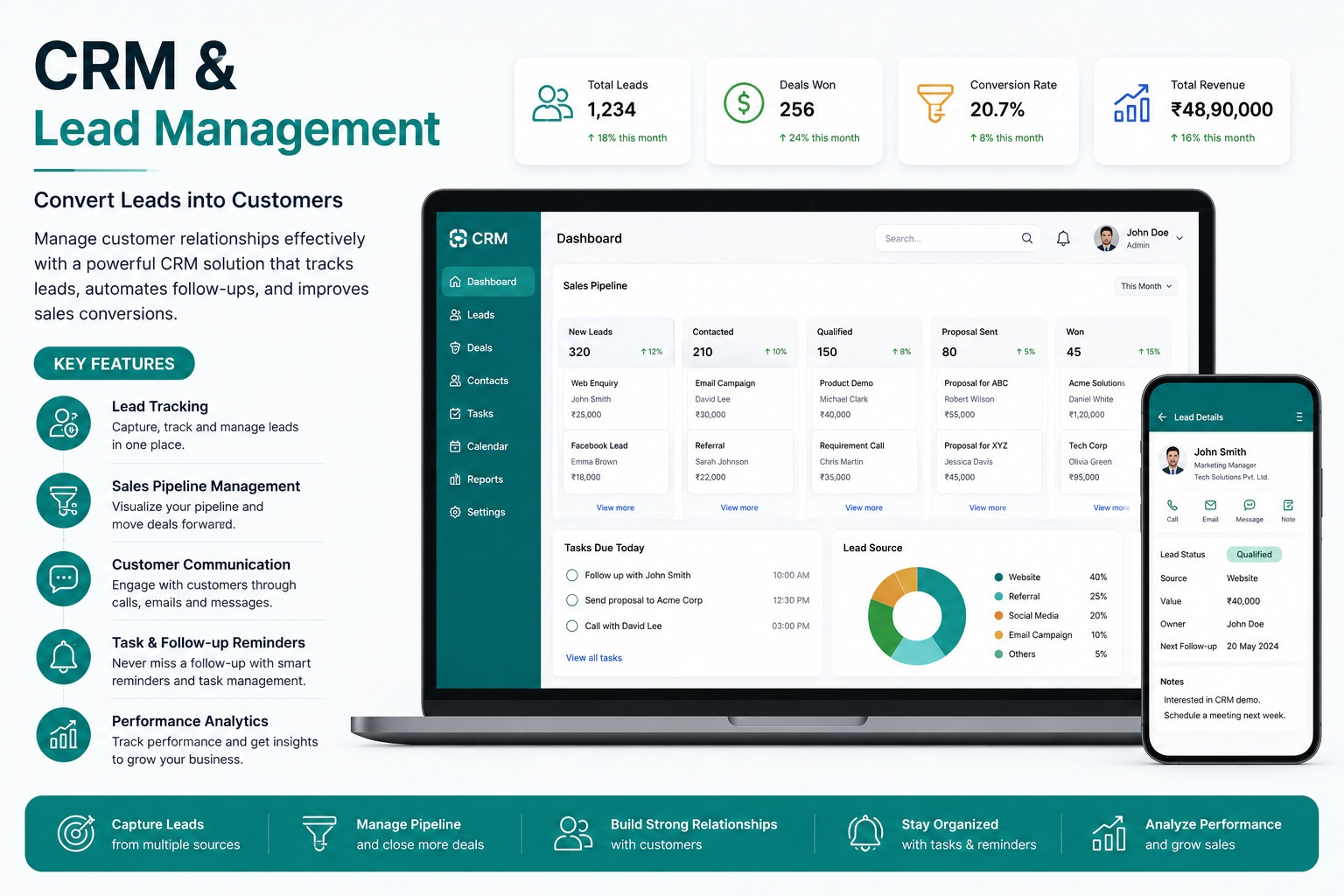
CRM & Lead Management

Capture leads, manage follow-ups, track pipelines, and improve conversion without scattered spreadsheets or missed reminders.

Core Operational Modules & Features:

βœ“Lead capture from forms, calls, WhatsApp, and campaigns
βœ“Pipeline stages for every opportunity
βœ“Tasks and follow-up reminders
βœ“Customer communication history
βœ“Sales analytics and revenue tracking
βœ“Desktop and mobile access
Technical & Architectural Q&A (20 FAQs Available):
What is a CRM and Lead Management System and why is it vital for modern sales teams?β–Ύ

A CRM and Lead Management System is a centralized software platform that captures customer inquiries across digital channels, organizes them into qualified stages, automates sales team assignments, tracks follow-up activities, and provides analytics to maximize deal conversion rates.

How does the CRM automatically capture leads from websites, WhatsApp, Meta ads, and portals?β–Ύ

The system integrates via webhooks and APIs to automatically ingest incoming leads from your company website, landing pages, Meta/Google advertising campaigns, WhatsApp Business API, incoming phone calls, and third-party aggregator portals without manual data entry.

Clinic Management System UI Dashboard Screenshot
Business Application
Module #04
Recommended For Industries:
ClinicsDoctorsPhysiotherapy CentersDiagnostic CentersSmall HospitalsHealthcare Startups
6–10 WEEKS DEPLOYMENTβœ“ Production Ready

Clinic Management System

Digitize patient registration, appointments, EMR records, billing, prescriptions, reports, and clinic operations.

Core Operational Modules & Features:

βœ“Patient profiles and visit history
βœ“Doctor-wise appointment scheduling
βœ“Electronic medical records
βœ“Billing and pending dues tracking
βœ“Digital prescriptions
βœ“Clinic performance dashboard
Technical & Architectural Q&A (20 FAQs Available):
What is a Clinic Management System and how does it optimize OPD clinic operations?β–Ύ

A Clinic Management System is an all-in-one healthcare software platform designed for doctors, polyclinics, and outpatient healthcare centers. It digitizes patient registration, doctor appointment scheduling, token queues, electronic medical records (EMR), prescription writing, and billing.

How does the appointment scheduling module manage doctor time slots and patient waiting queues?β–Ύ

The system provides an intuitive calendar for scheduling in-person and teleconsultation slots, supports walk-in token generation, and updates live queue status on reception displays to reduce patient waiting room congestion.

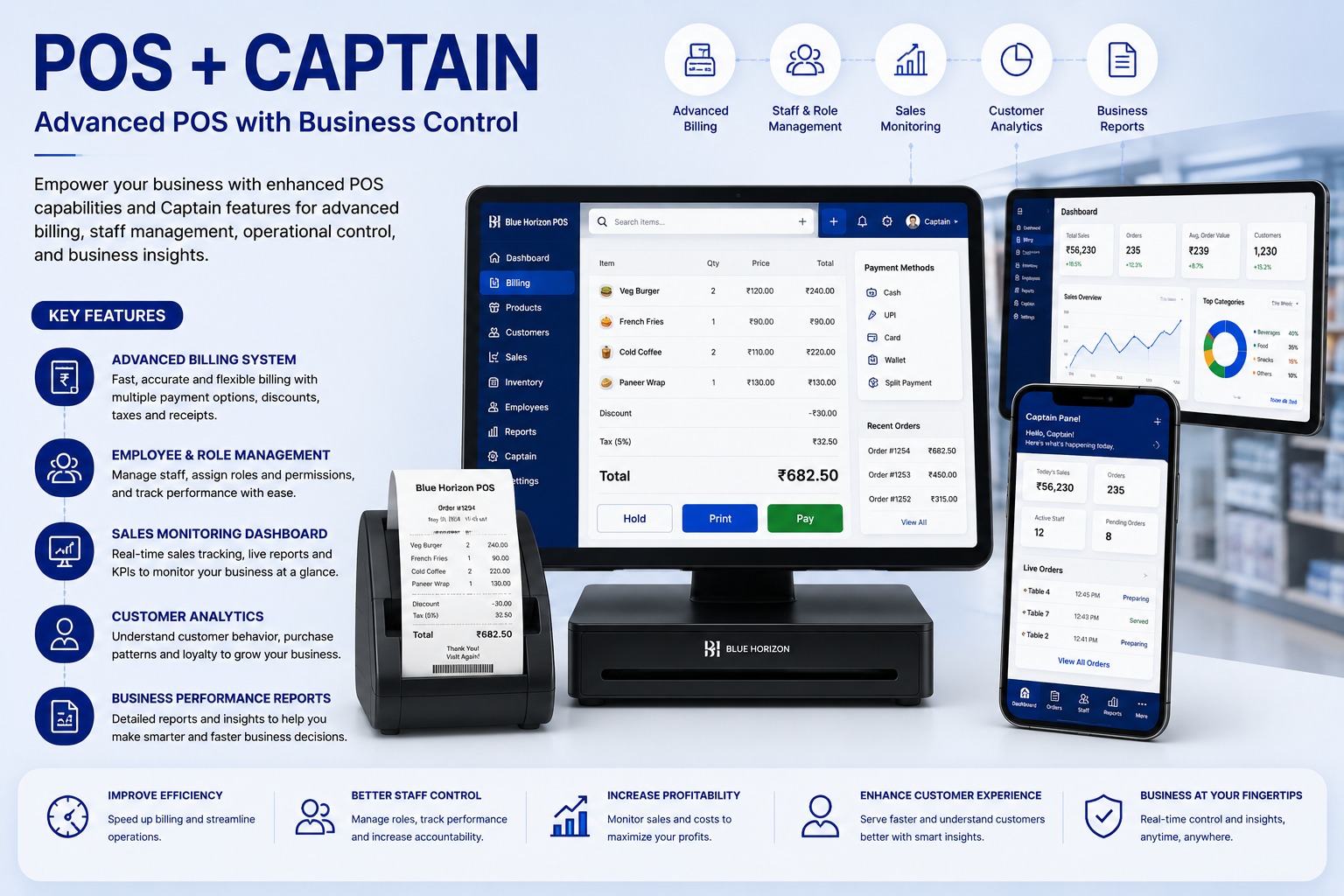
POS + Captain System UI Dashboard Screenshot
Business Application
Module #05
Recommended For Industries:
RestaurantsCafesFood CourtsQSR CountersCloud KitchensRetail Counters
6–10 WEEKS DEPLOYMENTβœ“ Production Ready

POS + Captain System

Advanced POS and captain panel for restaurants, cafes, counters, staff control, live orders, billing, and sales reports.

Core Operational Modules & Features:

βœ“Fast billing with discounts, taxes, and payment modes
βœ“Captain panel for live orders
βœ“Staff roles and permissions
βœ“Sales monitoring
βœ“Customer analytics
βœ“Receipt printing and reports
Technical & Architectural Q&A (20 FAQs Available):
What is a POS + Captain System and how does it elevate restaurant operational efficiency?β–Ύ

A POS + Captain System combines a centralized restaurant billing counter with mobile order-taking applications for table captains and waitstaff. Captains take food orders tableside on handheld devices, instantly dispatching digital Kitchen Order Tickets (KOT) directly to the kitchen.

How does the digital captain ordering app eliminate order delays and communication mistakes?β–Ύ

Instead of handwriting paper slips and walking to the kitchen, captains enter orders tableside with specific cooking preferences. KOTs print instantly on kitchen thermal printers or display on Kitchen Display Screens (KDS), speeding up preparation.

Retail POS System UI Dashboard Screenshot
Business Application
Module #06
Recommended For Industries:
Grocery StoresRetail ShopsSupermarketsPharmaciesCountersSmall Businesses
6–10 WEEKS DEPLOYMENTβœ“ Production Ready

Retail POS System

Retail billing, barcode scanning, inventory updates, receipts, multi-payment support, and daily sales reporting.

Core Operational Modules & Features:

βœ“Fast checkout and billing
βœ“Barcode product search
βœ“Inventory and low-stock alerts
βœ“Cash, UPI, card, and wallet payments
βœ“Receipt printing
βœ“Multi-store user and product control
Technical & Architectural Q&A (20 FAQs Available):
What is a Retail POS System and how does it speed up customer checkout times?β–Ύ

A Retail POS System is a fast counter billing and store management software that connects barcode scanning, automated pricing, real-time stock deduction, payment processing, and GST receipt generation into an effortless 5-second checkout workflow.

Can products be scanned and billed rapidly using standard 1D and 2D barcode scanners?β–Ύ

Yes. Cashiers can scan manufacturer UPC/EAN barcodes or custom in-house generated barcode labels using handheld laser or 2D QR scanners. The system also supports quick keyword searches and touch-screen hotkeys for items without barcodes.

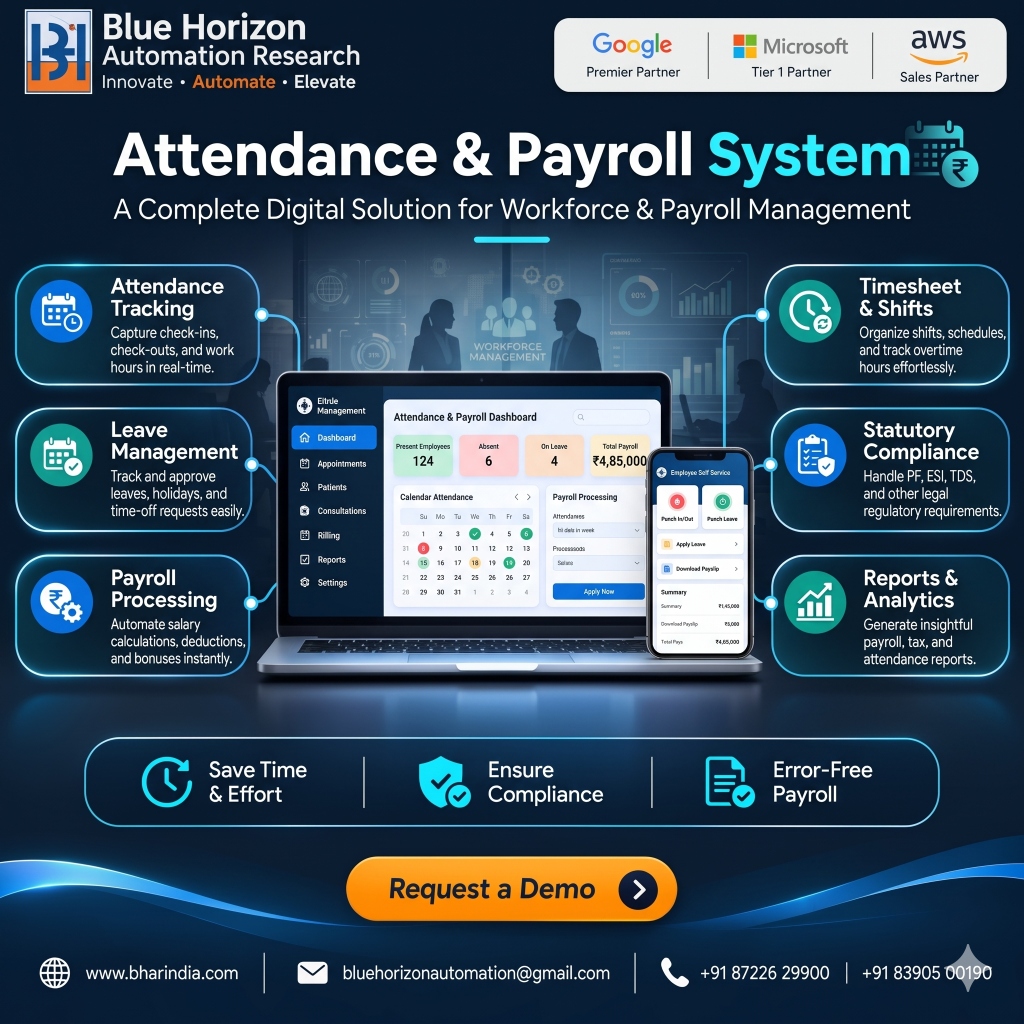
Attendance & Payroll System UI Dashboard Screenshot
Workforce & Payroll Management
Module #07
Recommended For Industries:
Retail Chains & Multi-Branch OutletsManufacturing & Industrial FacilitiesHealthcare, Hospitals & Nursing HomesIT Companies & Remote Tech TeamsLogistics, Supply Chain & WarehousingEducational Institutes & Universities
6–10 WEEKS DEPLOYMENTβœ“ Production Ready

Attendance & Payroll System

A Complete Digital Solution for Workforce & Payroll Management β€” real-time biometric and mobile check-ins, multi-tier shift scheduling, automated salary calculations, statutory compliance (PF, ESI, TDS, PT), and employee self-service portal.

Core Operational Modules & Features:

βœ“Attendance Tracking: Real-time biometric, facial recognition, and GPS-geofenced mobile check-ins/outs
βœ“Leave Management: Automated leave accrual, multi-level approvals, holiday calendars, and time-off tracking
βœ“Payroll Processing: Instant salary computation, dynamic allowances, overtime, deductions, and bonus calculations
βœ“Timesheet & Shifts: Flexible rotational shifts, night allowance, overtime logging, and roster planning
βœ“Statutory Compliance: Automated PF (Provident Fund), ESI, Professional Tax (PT), and TDS tax calculations
βœ“Reports & Analytics: In-depth payroll register, bank payout files, Form 16, attendance summaries, and MIS audits
βœ“Employee Self-Service (ESS): Mobile and web portal for leave applications, digital payslip downloads, and tax declarations
Technical & Architectural Q&A (10 FAQs Available):
What is the Attendance & Payroll System and how does it modernize workforce management?β–Ύ

Our Attendance & Payroll System is an enterprise-grade digital workforce solution built to streamline employee time-tracking, shift rosters, leave approvals, salary computation, and statutory compliance into a single unified cloud portal. It eliminates manual spreadsheet calculations, prevents attendance buddy-punching, and automates salary disbursement.

Does the system support biometric devices, facial recognition, and mobile GPS check-in?β–Ύ

Yes. The system seamlessly integrates with hardware biometric devices (fingerprint and iris scanners), AI facial recognition terminals, RFID cards, and mobile app punch-in with GPS geofencing and selfie verification for field staff.

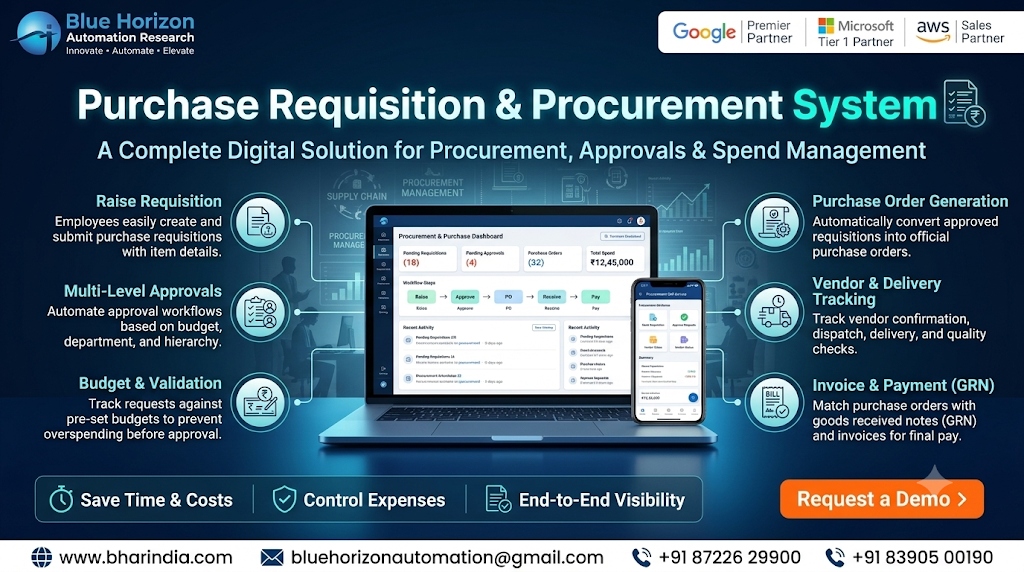
Purchase Requisition & Procurement System UI Dashboard Screenshot
Procurement & Spend Management
Module #08
Recommended For Industries:
Manufacturing & Industrial PlantsConstruction & Infrastructure CompaniesCorporate Enterprises & Tech ParksMulti-Location Retail Chains & WarehousesHospitals, Clinics & Healthcare NetworksEducational Institutes & Universities
6–10 WEEKS DEPLOYMENTβœ“ Production Ready

Purchase Requisition & Procurement System

A Complete Digital Solution for Procurement, Approvals & Spend Management β€” streamline internal purchase requisitions, multi-tier budget approvals, automated PO generation, vendor dispatch tracking, 3-way GRN matching, and enterprise ERP integration.

Core Operational Modules & Features:

βœ“Raise Requisition: Employees easily create and submit purchase requisitions with item catalogs, HSN codes, and quantity specs
βœ“Multi-Level Approvals: Automate dynamic approval workflows based on budget limits, departments, project cost centers, and management hierarchy
βœ“Budget & Validation: Track requests against pre-set cost center budgets in real-time to prevent departmental overspending before approval
βœ“Purchase Order Generation: Automatically convert approved requisitions into official, digitally signed purchase orders (PO) with vendor terms
βœ“Vendor & Delivery Tracking: Monitor vendor acknowledgement, dispatch dates, gate-pass tracking, transit status, and quality inspection checks
βœ“Invoice & Payment (GRN): Seamlessly match POs against Goods Received Notes (GRN) and vendor invoices with automated 3-way matching before payout
βœ“Self-Service Mobile App: Mobile and web portal for department heads to review, approve, or reject purchase indents with one click on the go
Technical & Architectural Q&A (10 FAQs Available):
What is the Purchase Requisition & Procurement System and how does it optimize enterprise spend?β–Ύ

Our Purchase Requisition & Procurement System is a centralized cloud software that digitizes the entire procure-to-pay (P2P) lifecycle. It replaces unstructured paper indents and email requests with systematic purchase requisitions, budget verification, automated approval matrices, electronic Purchase Orders (PO), Goods Received Notes (GRN), and 3-way invoice matching.

How does the system prevent departmental overspending and enforce budget controls?β–Ύ

The platform integrates real-time budget validation against department and project cost centers. If a purchase requisition exceeds the remaining monthly or quarterly budget, the system alerts the requestor, highlights variance flags, and routes the request for secondary management sanction.

Need a Custom Architecture or Hybrid Workflow?

We specialize in tailoring custom business logic, private cloud deployments, and integrating legacy ERPs directly into your operations.

⚑ 24-HOUR GUARANTEED RESPONSE

Connect With Our Engineering Desk

Speak directly with our automation consultants about robotic process automation, ERP rollout feasibility, or custom Flutter platforms.

πŸ“ž

Direct Call & WhatsApp

+91 87226 29900
Chat πŸ’¬
☁️

Cloud & Google Desk

+91 83905 00190
Desk πŸ’¬
βœ‰οΈ

Direct Official Email

customerdelight@bhar.co.in
πŸ“ Corporate Headquarters

Blue Horizon Automation Research Pvt. Ltd. (BHAR India)

Office No. 26/27, 3rd Floor, Matru Chhaya Apartment,
Opp. Kapeesh Mall, MG Road, Mulund West,
Mumbai, Maharashtra – 400080

πŸ•’ Mon–Sat: 9 AM–6 PM ISTGet Directionsβ†—

Send a Direct Enquiry

Inquiries are logged directly into Firestore and delivered to our senior engineering desk.